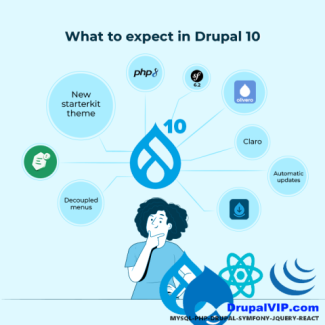
Drupal 10
Displaying 1 - 20 of 54what is apple-app-site-association file

The apple-app-site-association (AASA) file is a crucial component for iOS app developers that creates a secure and verified link between a website and its associated iOS applications.
It's often referred to as an AASA file.
In essence, the apple-app-site-association file acts as a bridge, allowing your website to tell iOS which of its URLs should be handled by your native app, providing a more seamless and integrated user experience.
why amazon server search for mcp.json file
When you see "Amazon server look for mcp.json file," it's primarily in the context of Amazon Q Developer and the broader Model Context Protocol (MCP).
Amazon servers (specifically within the context of Amazon Q Developer and other generative AI services) look for the mcp.json file because it's the standard configuration mechanism for the Model Context Protocol (MCP).
what is assetlinks.json
The main purpose of assetlinks.json is to enable Android App Links. This allows for a seamless user experience where clicking a link to your website directly opens the corresponding content within your Android app, rather than opening it in a web browser.
assetlinks.json is a vital component for any Android app that wants to provide a truly integrated and seamless experience for users interacting with its associated website.
drupal10, when do I need to implement __construct in custom controllerBase
You implement __construct() in your custom ControllerBase when you need to bring in any external service or object that isn't provided as a convenience method by ControllerBase itself. Always pair it with the create() static factory method for proper dependency injection in Drupal.
Code Snippet
<?php
namespace Drupal\my_module\Controller;
use Drupal\Core\Controller\ControllerBase;
use Drupal\Core\DependencyInjection\ContainerInjectionInterface;
use Drupal\Core\Logger\LoggerChannelFactoryInterface;
use Symfony\Component\DependencyInjection\ContainerInterface;
/**
* Custom controller that demonstrates dependency injection.
*/
class MyCustomController extends ControllerBase implements ContainerInjectionInterface {
/**
* The logger factory service.
*
* @var \Drupal\Core\Logger\LoggerChannelFactoryInterface
*/
protected $loggerFactory;
/**
* Constructs a new MyCustomController object.
*
* @param \Drupal\Core\Logger\LoggerChannelFactoryInterface $logger_factory
* The logger factory service.
*/
public function __construct(LoggerChannelFactoryInterface $logger_factory) {
$this->loggerFactory = $logger_factory;
}
/**
* {@inheritdoc}
*/
public static function create(ContainerInterface $container) {
return new static(
$container->get('logger.factory') // Request the 'logger.factory' service
);
}
/**
* Displays a custom page.
*/
public function myPage() {
$this->loggerFactory->get('my_module')->notice('My custom page was accessed.');
return [
'#markup' => $this->t('Welcome to my custom page with logging!'),
];
}
}
once() function javascript jQuery drupal, function reference
By effectively using the once() function, you can write robust and performant JavaScript for your Drupal applications that gracefully handles AJAX updates and ensures your code executes exactly when and how you intend.
Code Snippet
(function (Drupal, once) {
'use strict';
Drupal.behaviors.myCustomBehavior = {
attach: function (context, settings) {
// Select elements that haven't been "onced" yet with the ID 'my-unique-id'.
// 'context' is typically the part of the DOM that was just loaded or updated.
// '.my-selector' is your CSS selector for the elements you want to target.
const elementsToProcess = once('my-unique-id', '.my-selector', context);
// `elementsToProcess` is an array of DOM elements that haven't been processed
// with 'my-unique-id' yet.
elementsToProcess.forEach(function (element) {
// Your JavaScript code to run only once per element.
// `element` is a native DOM element, not a jQuery object.
console.log('Processing element:', element);
// Example: Add a class
element.classList.add('processed-by-my-behavior');
// Example: Attach an event listener
element.addEventListener('click', function() {
console.log('Click event fired on a processed element!');
});
// If you still need jQuery for something specific within the loop,
// you can wrap the native element:
// $(element).css('background-color', 'lightgreen');
});
// To process the <body> or <html> element only once per full page load,
// you can use 'html' or 'body' as the selector and omit context (or pass document).
// Note: `once` returns an array, so if you expect only one, you might destructure or use .shift()
const [htmlElement] = once('my-global-script', 'html', document);
if (htmlElement) {
// This code will run only once when the page fully loads.
console.log('Global script initialized on HTML element.');
}
}
};
})(Drupal, once);How to display a message in Drupal 9, 10, 11
How to display a message in Drupal 9
Messages can be displayed using Drupal Messenger service,
\Drupal::messenger()->addMessage('This is a custom message', 'custom');
\Drupal::messenger()->addError(t('This is an error message, red in color'));
\Drupal::messenger()->addStatus(t('This is a status message, green in color'));
\Drupal::messenger()->addWarning(t('This is a warning message, yellow in color'));
Code Snippet
\Drupal::messenger()->addMessage('This is a custom message', 'custom');
\Drupal::messenger()->addError(t('This is an error message, red in color'));
\Drupal::messenger()->addStatus(t('This is a status message, green in color'));
\Drupal::messenger()->addWarning(t('This is a warning message, yellow in color'));REACT: Controlled or Uncontrolled components
The form is one of the most-used HTML elements in web development.
Since the introduction of React, the way forms have been handled has changed in many ways.
In React, there are two ways to handle form data in our components:
The first way is the Controlled Component:
We handle form data by using the state within the component to handle the form data.
The Second way is Uncontrolled Component:
We let the DOM handle the form data by itself in the component.
Code Snippet
Controlled Component
import React, { Component } from 'react';
class App extends Component {
state = {
message: ''
}
updateMessage = (newText) => {
console.log(newText);
this.setState(() => ({
message: newText
}));
}
render() {
return (
<div className="App">
<div className="container">
<input type="text"
placeholder="Your message here.."
value={this.state.message}
onChange={(event) => this.updateMessage(event.target.value)}
/>
<p>the message is: {this.state.message}</p>
</div>
</div>
);
}
}
Tag-Based Caching IN Drupal Views
tag-based caching in Drupal views
Tag-based caching enhances the performance of your website by allowing fine-grained invalidation of cached content.
This is particularly important for dynamic websites where content changes frequently, but you still want to leverage caching to reduce server load and improve page load times.
Messenger Api: How to set message
Drupal set message was deprecated in Drupal 8.5 and will be removed before Drupal 9.
Time for a roundup of this new API and how to use it.
Code Snippet
\Drupal::messenger()->addMessage('This is a regular message');
\Drupal::messenger()->addStatus('This is a status message, meaning status is OK or successful (green).');
\Drupal::messenger()->addError('This is an error message (red)');
\Drupal::messenger()->addWarning('This is a warning message (orange)');Sending JSON with Basic Authentication Credentials
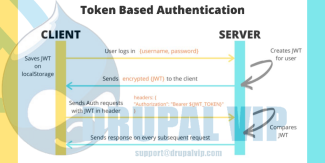
To post JSON to a server with Basic Authentication credentials, you need to make an HTTP POST or PUT request, include the JSON in the body of the HTTP message, and pass the "Authorization: Basic [token]" HTTP header to the server.
The [token] is a Base64 encoded string of user credentials in the form of a login:password string.
In this POST JSON with a Basic Authentication Credentials Example, we send a POST request with JSON body and "Authorization: Basic [token]" header to the ReqBin echo URL.
Code Snippet
<script>
var USERNAME="admi";
var PASSWORD="chanud";
var person = {
firstName:"tester2",
lastName:"drupal",
userName:"tester2drupal",
eMail:"teter2@drupalvip.com",
pass1:"teter2drupal",
passConfirm:"teter2drupal",
role:"Affiliate"
};
$.ajax({
type: "POST",
url: 'https://mydomain/api/route',
dataType: 'json',
headers: {
"Authorization": "Basic " + btoa(USERNAME + ":" + PASSWORD)
},
data: person,
//data: JSON.stringify(person),
success: function (data) {
$("response").html(data.msg);
},
});
</script>Drupal 7 to Drupal 9 in an hour, is it possible
Countless blog posts have been written about migrating from Drupal 7 to 8/9/10.
Some recommend how to begin breaking down this rather overwhelming endeavor into manageable pieces.
Others provide concrete technical recommendations for very specific Drupal 7 setups.
DrupalVIP technical notebook & support
How To Attach Library To A Specific Content Type
If you need to upload a library with a module during its operation, in Drupal it's called attaching file.
Attaching a library can be done in several ways depending on your needs.
Remember that the library is always registered by its module or theme name followed by the library name.
DrupalVIP technical notebook & support
Code Snippet
function rwcenter_page_attachments(array &$attachments) {
$attachments['#attached']['library'][] = 'rwcenter/content';
$node = \Drupal::routeMatch()->getParameter('node') ?? \Drupal::routeMatch()->getParameter('node_preview');
if (is_null($node)) {}
else {
if ($node->getType()=='rwcenter') {
$attachments['#attached']['library'][] = 'rwcenter/content';
}
}
}Creating a Block in Drupal 10 Programmatically
Drupal's great feature is Custom Block. blocks are easy and fast to set in any region, with Drupal9 you can even set the same block in a few regions.
There are a few technical options to create a block, here we will overview the programming option only.
so, what is a block?
Blocks are chunks of content with ID and classes which can be placed in manipulated within the page.
Code Snippet
namespace Drupal\my_module\Plugin\Block;
use Drupal\Core\Block\BlockBase;
use Drupal\Core\Block\BlockPluginInterface;
use Drupal\Core\Form\FormStateInterface;
use Drupal\Core\Session\AccountInterface;
use Drupal\Core\Access\AccessResult;
use Drupal\Core\Cache\UncacheableDependencyTrait;
/**
* Provides a 'SetTask' Block.
*
* @Block(
* id = "dashboard_newtask_block",
* admin_label = @Translation("Dashboard New Task"),
* category = @Translation("DrupalVIP"),
* )
*/
class NewTaskBlock extends BlockBase implements BlockPluginInterface {
use UncacheableDependencyTrait;
/**
* {@inheritdoc}
*/
public function build() {
// Do NOT cache a page with this block on it.
\Drupal::service('page_cache_kill_switch')->trigger();
// build from form
$build = \Drupal::formBuilder()->getForm('Drupal\drupalvip_dashboard\Form\NewTaskForm');
$build['#attributes']['class'][] = 'my_class';
$build['#cache']['max-age'] = 0;
$build['#cache']['contexts'] = [];
$build['#cache']['tags'] = [];
return $build;
}
/**
* {@inheritdoc}
*/
public function blockForm($form, FormStateInterface $form_state) {
$form = parent::blockForm($form, $form_state);
$config = $this->getConfiguration();
$form['block_note'] = [
'#type' => 'textfield',
'#title' => $this->t('Note'),
'#description' => $this->t('block note '),
'#default_value' => isset($config['block_note']) ? $config['block_note'] : '',
];
return $form;
}
/**
* {@inheritdoc}
*/
public function blockSubmit($form, FormStateInterface $form_state) {
parent::blockSubmit($form, $form_state);
$values = $form_state->getValues();
$this->configuration['block_note'] = $values['block_note'];
}
} // end of class
Custom Block: Create fast and simple
Blocks are individual pieces of your site’s web page layout. They are placed inside the regions of your theme, and can be created, removed, and rearranged in the Block layout (admin/structure/block) administration page.
Examples of blocks include the Who’s online listing, the main navigation menu, and the breadcrumb trail. The main page content is also a block.
Code Snippet
<?php
namespace Drupal\basic_module\Plugin\Block;
use Drupal\Core\Block\BlockBase;
/**
* Block annotation
*
* @Block(
* id = "basic_block",
* admin_label = @Translation("Basic Block"),
* )
*/
class BasicBlock extends BlockBase {
/**
* {@inheritDoc}
*/
public function build() {
$markup = '';
$markup .= '<div>';
$markup .= ' <p>Anything can come here: code, variables, html, etc. </p>' ;
$markup .= '</div>';
return [
'#type' => 'markup',
'#markup' => $markup,
];
}
} // end of classSuccess Message After Submitting Form
In building a custom form you must keep in mind a few issues:
elements, functionality, and response for best user experience
DrupalVIP technical notebook & support
Code Snippet
public function submitForm(array &$form, FormStateInterface $form_state) {
$this->logger('user')->notice('Deleted %ip', ['%ip' => $this->banIp,]);
$this->messenger()->addStatus($this->t('The IP address %ip was deleted.', [ '%ip' => $this->banIp, ]));
$form_state->setRedirectUrl($this->getCancelUrl());
}