Drupal 9

Displaying 1 - 20 of 44

what is apple-app-site-association file

The apple-app-site-association (AASA) file is a crucial component for iOS app developers that creates a secure and verified link between a website and its associated iOS applications. 
It's often referred to as an AASA file.
In essence, the apple-app-site-association file acts as a bridge, allowing your website to tell iOS which of its URLs should be handled by your native app, providing a more seamless and integrated user experience.

 

what is assetlinks.json

The main purpose of assetlinks.json is to enable Android App Links. This allows for a seamless user experience where clicking a link to your website directly opens the corresponding content within your Android app, rather than opening it in a web browser.
assetlinks.json is a vital component for any Android app that wants to provide a truly integrated and seamless experience for users interacting with its associated website.

drupal10, when do I need to implement __construct in custom controllerBase

You implement __construct() in your custom ControllerBase when you need to bring in any external service or object that isn't provided as a convenience method by ControllerBase itself. Always pair it with the create() static factory method for proper dependency injection in Drupal.

<?php

namespace Drupal\my_module\Controller;

use Drupal\Core\Controller\ControllerBase;
use Drupal\Core\DependencyInjection\ContainerInjectionInterface;
use Drupal\Core\Logger\LoggerChannelFactoryInterface;
use Symfony\Component\DependencyInjection\ContainerInterface;

/**
 * Custom controller that demonstrates dependency injection.
 */
class MyCustomController extends ControllerBase implements ContainerInjectionInterface {

  /**
   * The logger factory service.
   *
   * @var \Drupal\Core\Logger\LoggerChannelFactoryInterface
   */
  protected $loggerFactory;

  /**
   * Constructs a new MyCustomController object.
   *
   * @param \Drupal\Core\Logger\LoggerChannelFactoryInterface $logger_factory
   * The logger factory service.
   */
  public function __construct(LoggerChannelFactoryInterface $logger_factory) {
    $this->loggerFactory = $logger_factory;
  }

  /**
   * {@inheritdoc}
   */
  public static function create(ContainerInterface $container) {
    return new static(
      $container->get('logger.factory') // Request the 'logger.factory' service
    );
  }

  /**
   * Displays a custom page.
   */
  public function myPage() {
    $this->loggerFactory->get('my_module')->notice('My custom page was accessed.');

    return [
      '#markup' => $this->t('Welcome to my custom page with logging!'),
    ];
  }

}

once() function javascript jQuery drupal, function reference

By effectively using the once() function, you can write robust and performant JavaScript for your Drupal applications that gracefully handles AJAX updates and ensures your code executes exactly when and how you intend.

(function (Drupal, once) {
  'use strict';

  Drupal.behaviors.myCustomBehavior = {
    attach: function (context, settings) {
      // Select elements that haven't been "onced" yet with the ID 'my-unique-id'.
      // 'context' is typically the part of the DOM that was just loaded or updated.
      // '.my-selector' is your CSS selector for the elements you want to target.
      const elementsToProcess = once('my-unique-id', '.my-selector', context);

      // `elementsToProcess` is an array of DOM elements that haven't been processed
      // with 'my-unique-id' yet.
      elementsToProcess.forEach(function (element) {
        // Your JavaScript code to run only once per element.
        // `element` is a native DOM element, not a jQuery object.
        console.log('Processing element:', element);

        // Example: Add a class
        element.classList.add('processed-by-my-behavior');

        // Example: Attach an event listener
        element.addEventListener('click', function() {
          console.log('Click event fired on a processed element!');
        });

        // If you still need jQuery for something specific within the loop,
        // you can wrap the native element:
        // $(element).css('background-color', 'lightgreen');
      });

      // To process the <body> or <html> element only once per full page load,
      // you can use 'html' or 'body' as the selector and omit context (or pass document).
      // Note: `once` returns an array, so if you expect only one, you might destructure or use .shift()
      const [htmlElement] = once('my-global-script', 'html', document);
      if (htmlElement) {
        // This code will run only once when the page fully loads.
        console.log('Global script initialized on HTML element.');
      }
    }
  };
})(Drupal, once);

How to display a message in Drupal 9, 10, 11

How to display a message in Drupal 9
Messages can be displayed using Drupal Messenger service,
\Drupal::messenger()->addMessage('This is a custom message', 'custom');
\Drupal::messenger()->addError(t('This is an error message, red in color'));
\Drupal::messenger()->addStatus(t('This is a status message, green in color'));
\Drupal::messenger()->addWarning(t('This is a warning message, yellow in color'));

\Drupal::messenger()->addMessage('This is a custom message', 'custom');
\Drupal::messenger()->addError(t('This is an error message, red in color'));
\Drupal::messenger()->addStatus(t('This is a status message, green in color'));
\Drupal::messenger()->addWarning(t('This is a warning message, yellow in color'));

Messenger Api: How to set message

Drupal set message was deprecated in Drupal 8.5 and will be removed before Drupal 9. 
Time for a roundup of this new API and how to use it.

\Drupal::messenger()->addMessage('This is a regular message');
\Drupal::messenger()->addStatus('This is a status message, meaning status is OK or successful (green).');
\Drupal::messenger()->addError('This is an error message (red)');
\Drupal::messenger()->addWarning('This is a warning message (orange)');

Sending JSON with Basic Authentication Credentials

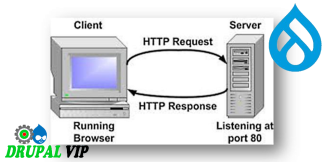
To post JSON to a server with Basic Authentication credentials, you need to make an HTTP POST or PUT request, include the JSON in the body of the HTTP message, and pass the "Authorization: Basic [token]" HTTP header to the server. 
The [token] is a Base64 encoded string of user credentials in the form of a login:password string. 
In this POST JSON with a Basic Authentication Credentials Example, we send a POST request with JSON body and "Authorization: Basic [token]" header to the ReqBin echo URL. 

<script>
      var USERNAME="admi";
      var PASSWORD="chanud";

      var person = {
        firstName:"tester2",
        lastName:"drupal",
        userName:"tester2drupal",
        eMail:"teter2@drupalvip.com",
        pass1:"teter2drupal",
        passConfirm:"teter2drupal",
        role:"Affiliate" 
      };
      
      $.ajax({
        type: "POST",
        url: 'https://mydomain/api/route',
        dataType: 'json',
        headers: {
         "Authorization": "Basic " + btoa(USERNAME + ":" + PASSWORD)
        },
        data: person,
        //data: JSON.stringify(person),
        success: function (data) {
          $("response").html(data.msg);
        },                
      });
    </script>

How to prevent drupal to filter out style attribute from custom block code

When creating custom block, the inherit function build() return an element, usualy it include tag: #markup,

but it seems that it filter out the attributes, so how can we overwrite it correctly without the filter?

In other words we want to prevent drupal to filter out style attribute from custom block code

The '#markup' is filtered in ->ensureMarkupIsSafe(), which is called from within ->doRender().

The same does not apply to '#children' .


Display Forms in a Modal Dialog

Display create a node in a modal dialog

By default when creating a node, the save action will redirect the user to another page but if we want to just close the modal dialog and leave the user on the same page we need to tell the form to do that.

For this we are going to alter the form and add an AJAX command letting Drupal know that we want to close the dialog as soon as the node is created.

use Drupal\Core\Form\FormStateInterface;
use Drupal\Core\Ajax\AjaxResponse;
use Drupal\Core\Ajax\CloseModalDialogCommand;
use Drupal\Core\Ajax\RedirectCommand;

/**
 * Implements hook_form_alter().
 */
function modal_form_example_form_node_article_form_alter(&$form, FormStateInterface $form_state, $form_id) {
  $form['actions']['submit']['#submit'][] = '_modal_form_example_ajax_submit';
  $form['actions']['submit']['#attributes']['class'][] = 'use-ajax-submit';
  // in some cases this was needed:
  // $form['#attached']['library'][] = 'core/jquery.form';
  // $form['#attached']['library'][] = 'core/drupal.ajax';
}

/**
 * Close the Modal and redirect the user to the homepage.
 *
 * @param array $form
 *   The form that will be altered.
 * @param \Drupal\Core\Form\FormStateInterface $form_state
 *   FormState Object.
 */
function _modal_form_example_ajax_submit(array $form, FormStateInterface &$form_state) {
  $response = new AjaxResponse();
  $response->addCommand(new CloseModalDialogCommand());
  $form_state->setResponse($response);
}

Full list of available #ajax properties

Adding AJAX callback events to form fields allows to dynamically update fields and other markup, while users interact with the forms.

More general information about Drupal and Ajax can be found at Drupal Ajax API Guide and Drupal's Ajax API documentation (at api.drupal.org).

Some working examples can be found in the Examples for Developers modules, specifically in the AJAX Example submodule, see its Form folder.

Form Element 'table' with TableDrag and TableSelect

Building and rendering a table required writing a custom/dedicated theme function for most tables in Drupal 7.

Drupal 8 introduces a new element '#type' => 'table', which comes with built-in, optional support for TableDrag and TableSelect, and which requires no more custom plumbing for most use-cases.

Note: The following conversion example shows both TableDrag and TableSelect in a single table for brevity, but they are usually not combined in a single table.