User account menu

  • Log in

Breadcrumb

  • Home
  • Front-End
Home
DrupalVIP
Freelancer service with great care and enthusiasm.

Main navigation

  • Home
  • Products
  • Blog
  • Support

Front-End

Front-End

Displaying 1 - 12 of 12

External Resources

React Resources And Reference, especially when integrating with Drupal

This article is a collection of important links and resources for React beginners and React experts who wish to integrate between them, It will include reference resources, links, images, and even media.

Please comment with every important link.

DrupalVIP technical notebook & support


Drupal Support
React
JSX
javascript
React Example
Reactj
React Tutorial
Front-End
JavaScript Reference
HTML to JSX
React Reference
React Bootstrap

Creating a Block in Drupal 10 Programmatically

Drupal's great feature is Custom Block. blocks are easy and fast to set in any region, with Drupal9 you can even set the same block in a few regions.
There are a few technical options to create a block, here we will overview the programming option only.
so, what is a block?
Blocks are chunks of content with ID and classes which can be placed in manipulated within the page. 

Custom Block
Drupal
Code Example
Theme
hook_theme
Twig
Front-End
BlockBase
Code Snippet
Drupal 10
@Block
BlockPluginInterface
page_cache_kill_switch
blockForm
#cache
Code Snippet
namespace Drupal\my_module\Plugin\Block;

use Drupal\Core\Block\BlockBase;
use Drupal\Core\Block\BlockPluginInterface;
use Drupal\Core\Form\FormStateInterface;
use Drupal\Core\Session\AccountInterface;
use Drupal\Core\Access\AccessResult;
use Drupal\Core\Cache\UncacheableDependencyTrait;

/**
 * Provides a 'SetTask' Block.
 *
 * @Block(
 *   id = "dashboard_newtask_block",
 *   admin_label = @Translation("Dashboard New Task"),
 *   category = @Translation("DrupalVIP"),
 * )
 */
class NewTaskBlock extends BlockBase implements BlockPluginInterface {
    use UncacheableDependencyTrait;
    
    /**
    * {@inheritdoc}
    */
    public function build() {
        // Do NOT cache a page with this block on it.
        \Drupal::service('page_cache_kill_switch')->trigger(); 
        // build from form               
        $build = \Drupal::formBuilder()->getForm('Drupal\drupalvip_dashboard\Form\NewTaskForm');
        $build['#attributes']['class'][] = 'my_class';
        $build['#cache']['max-age'] = 0;
        $build['#cache']['contexts'] = [];
        $build['#cache']['tags'] = [];                   
        return $build;
    }       
  
    /**
    * {@inheritdoc}
    */
    public function blockForm($form, FormStateInterface $form_state) {
        $form = parent::blockForm($form, $form_state);
        $config = $this->getConfiguration();
        $form['block_note'] = [
            '#type' => 'textfield',
            '#title' => $this->t('Note'),
            '#description' => $this->t('block note '),
            '#default_value' => isset($config['block_note']) ? $config['block_note'] : '',
        ];
        return $form;
    }  

    /**
    * {@inheritdoc}
    */
    public function blockSubmit($form, FormStateInterface $form_state) {
        parent::blockSubmit($form, $form_state);        
        $values = $form_state->getValues();
        $this->configuration['block_note'] = $values['block_note'];
    }    
    
} // end of class

How to pass a Function as a Prop

Props or properties in react are a functional argument by which different components communicate with each other. 
Props is just a data/information that allows us to pass in JSX tags. 
With the help of props, we can pass values like JavaScript objects, arrays or functions, etc.

DrupalVIP technical notebook & support
React Props
React Example
React Component
Code Snippet
React useState
React
React JS
Code Example
Module Development
Front-End
Drupal FrontEnd
Code Snippet
import React from "react";

function Course(props) {
  return (
    <div>
      <ul>
        <li>{props.courseName}</li>
      </ul>
    </div>
  )
}

function App() {
  return (
    <div>
      <h1>Guvi Courses</h1>
      <Course courseName="Full Stack Development"  />
    </div>
  );
}

export default App;

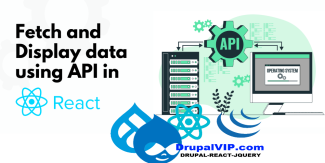
Fetching data using inbuilt fetch API

All modern browsers come with an inbuilt fetch Web API, which can be used to fetch data from APIs. 
In this tech article, I will to show you how to do fetching data from the JSON Server APIs.

DrupalVIP technical notebook & support
React Example
Code Snippet
response.json
React Fetch
React useEffect
React useState
React
Front-End
React For Loop
React Map
Fetch Data
Code Snippet
import React, { useEffect, useState } from "react"

const UsingFetch = () => {
  const [users, setUsers] = useState([])

  const fetchData = () => {
    fetch("https://jsonplaceholder.typicode.com/users")
      .then(response => {
        return response.json()
      })
      .then(data => {
        setUsers(data)
      })
  }

  useEffect(() => {
    fetchData()
  }, [])

  return (
    <div>
      {users.length > 0 && (
        <ul>
          {users.map(user => (
            <li key={user.id}>{user.name}</li>
          ))}
        </ul>
      )}
    </div>
  )
}

export default UsingFetch

React Watch Error: node_modules/.bin/webpack: Permission denied

DrupalVIP Support

DrupalVIP technical notebook & support

error on activating: npm run watch

npm install
React
Webpack
Webpack Error
Drupal 10
Front-End

Drupal And React

Its time for a more powerful client-side with drupal, and we can do this with React

So, what is React and how can we integrate it with Drupal. I will try to answer both questions and more within this article.

React is a JavaScript library that makes it easy to create interactive user interfaces. 

Drupal is a content management system (CMS) with a powerful web services API.

Drupal
React JS
Front-End
React
javascript
Drupal 10

How to prevent drupal to filter out style attribute from custom block code

When creating custom block, the inherit function build() return an element, usualy it include tag: #markup,

but it seems that it filter out the attributes, so how can we overwrite it correctly without the filter?

In other words we want to prevent drupal to filter out style attribute from custom block code

The '#markup' is filtered in ->ensureMarkupIsSafe(), which is called from within ->doRender().

The same does not apply to '#children' .


Drupal
Code Example
Front-End
HTML 5
Custom Block
Module Development
Drupal 9

React vs Angular

What is React JS?

React is a Javascript library developed by Facebook which allows you to build UI components. It facilitates the creation of interactive User Interfaces. It also makes the code easier to understand and launch. React JavaScript framework uses server-side rendering to provide a flexible, performance-oriented solution.

React JS
Drupal
AngularJS
Front-End
javascript

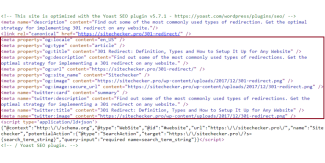
The Open Graph Protocol

The Open Graph protocol enables any web page to become a rich object in a social graph. For instance, this is used on Facebook to allow any web page to have the same functionality as any other object on Facebook.

Open Graph
Meta Tags
SEO
Code Example
Front-End

Open Form in Modal mode also known as Pop-Up

Modal dialogs are incredibly useful on websites as they allow the user to do something without having to leave the web page they are on. Drupal 8 now has a Dialog API in core, which greatly reduces the amount of code you need to write to create a modal dialog. Dialogs in Drupal 8 leverage jQuery UI.

Drupal
Drupal 9
Jquery UI
Modal Dialogs
Module Development
Front-End
Code Example
use-ajax
jquery integration

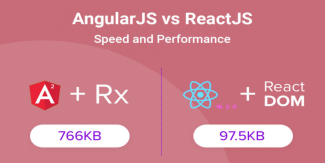
AngularJS Vs ReactJS comparison

Web development teams across the world highly prefer AngularJS and ReactJS.
However, technical decision-makers, like project managers and development managers face the dilemma of choosing between the two.
As you will agree, every business has its unique development needs. Therefore, there is no standalone framework that would suit the varied development needs.
We’ve attempted to offer a detailed comparison to support the business processes.

React
AngularJS
React JS
Front-End
theme development

Field Values in Twig

Master list (in progress) of how to get parts of fields for use in Twig templates. I’m always having to look these up, so I thought I’d hash them out and write them down.

Drupal
Drupal 9
Twig
theme development
Front-End
Drupal 8
Code Example
Drupal Integration
Subscribe to Front-End

The Freelancer Assistance

Proactive Maintenance

Proactive Maintenance

Drupal Shared Space

Drupal Shared Space

Drupal Training

drupal training session

Drupal Development

Drupal Development

Site Management

Site Management

Fullstack Service

Fullstack Service
Review All Services

Buy Hourly Support


Drupal platform support for complex websites. The service includes support, training, troubleshooting, fixes, updates, tool creation and module building.
* Minimum order is for 5 hours of support
* For every 20 hours of order you will be entitled to an additional hour of support
* For every 50 hours of order you will be entitled to 5 additional hours of support


>> Payment <<

 
cards

מופעל על-ידי paypal

Legal

  • Home
  • Contact
  • Products

Copyright © 2026 DrupalVIP - All rights reserved

Developed & Designed by Yuval Ben-Hur