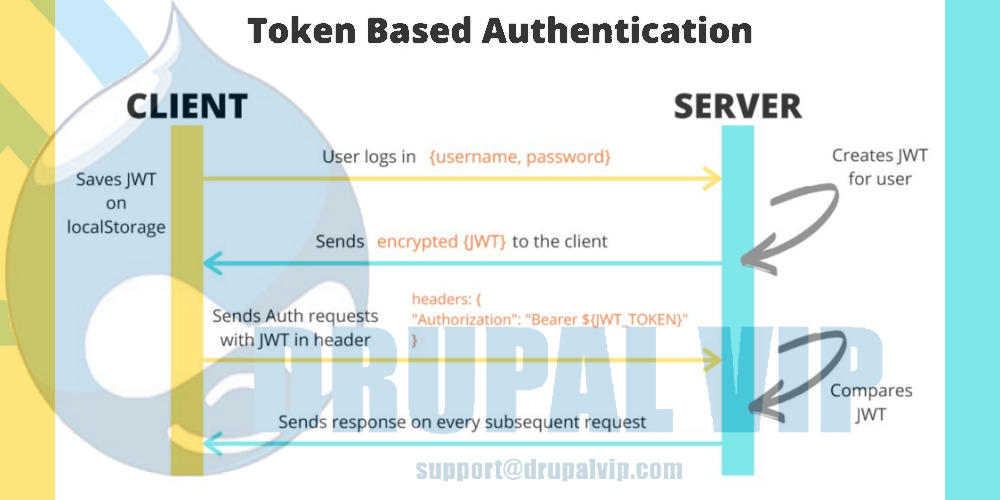
Sending JSON with Basic Authentication Credentials [JavaScript/AJAX Code]
To post JSON to a server with Basic Authentication credentials, you need to make an HTTP POST or PUT request, include the JSON in the body of the HTTP message, and pass the "Authorization: Basic [token]" HTTP header to the server.
The [token] is a Base64 encoded string of user credentials in the form of a login:password string.
In this POST JSON with a Basic Authentication Credentials Example, we send a POST request with JSON body and "Authorization: Basic [token]" header to the ReqBin echo URL.
JavaScript/AJAX code for POST JSON String Basic Authentication Example
Click Send to execute POST JSON with Basic Authentication example online and see the results.
The JavaScript/AJAX code was automatically generated for the POST JSON String Basic Authentication example.
POST /echo/post/json HTTP/1.1
Host: reqbin.com
Accept: application/json
Authorization: Basic e3VzZXJuYW1lfTp7cGFzc3dvcmR9
Content-Type: application/json
Content-Length: 61
{
	"employee":{ "name":"Emma", "age":28, "city":"Boston" }
}
What is HTTP?
Hypertext Transfer Protocol is a data transfer protocol that is widely used to transfer data between HTTP clients (browsers and mobile apps) and servers.
HTTP is based on "client-server" technology.
The client makes a request and initiates a connection, and the server receives the request and then executes it and sends the result to the client.
HTTP defines various request methods that indicate the desired action (add, update, delete) for a given resource.
Each request method implements its semantics and performs a specific action.
What is HTTP Authentication?
HTTP Authentication is a simple request and response method by which a server can request authentication information from a client and provide a framework for controlling access to resources.
Authentication is a consequence of determining whether a client has the right to access a resource.
HTTP supports authentication as a means of negotiating access to a protected resource.
What is Basic Authentication?
Basic Authentication is a simple authentication method built into the HTTP protocol.
The Basic Authentication sends the base64 encoded string with the username and password in the Authorization header.
Basic Authentication should only use in conjunction with other security mechanisms such as HTTPS/SSL for security reasons.
To send basic authentication credentials to the server, you need to convert the "username: password" pair to a Base64 encoded string and pass it in the authorization request header.
Basic Authentication Syntax
The following is the common syntax for Basic Authentication header:
Basic Authentication Header Syntax
Authorization: Basic {base64 encoded string}
Where:
- Authorization: standard HTTP authorization header
- Basic: indicates HTTP Authorization type
What is JSON?
JSON (JavaScript Object Notation) is a text-based format for structured storage and data exchange in a human-readable format.
JSON is used in almost all scripting languages.
JSON comes from JavaScript and has a syntax similar to JavaScript but can be used separately from it.
JSON allows information to be transmitted over the network.
After receiving data in JSON format, the client converts the data into objects in the given programming language.
For example, for JavaScript, the conversion is done by calling the JSON.parse(data) method.
JSON itself has no methods, only properties.
Conversions from JSON data to objects are done by calling methods of the programming language;
JSON is not the only data storage format.
There are other formats for the same purpose, such as XML and YAML.
JSON Example
{
	"Id": 78912,
	"Customer": "Jason Sweet",
	"Quantity": 1,
	"Price": 18.00
}
What is POST request?
HTTP POST is one of the most commonly used HTTP methods.
The POST request may or may not contain data.
The POST requests are usually used when submitting web forms or when uploading files to a server.
The POST data is included in the body of the POST message.
The Content-Type header indicates the type of the POST request body, and the length is specified in the Content-Length header.
Basic Authentication POST Request Example
POST /echo/post/json HTTP/1.1
Authorization: Basic e3VzZXJuYW1lfTp7cGFzc3dvcmR9
Host: reqbin.com
Accept: application/json
Content-Type: application/json
Content-Length: 61
Code sample with jQuery
    <script>
      var USERNAME="admi";
      var PASSWORD="chanud";

      var person = {
        firstName:"tester2",
        lastName:"drupal",
        userName:"tester2drupal",
        eMail:"teter2@drupalvip.com",
        pass1:"teter2drupal",
        passConfirm:"teter2drupal",
        role:"Affiliate"
      };

      $.ajax({
        type: "POST",
        url: 'https://mydomain/api/route',
        dataType: 'json',
        headers: {
         "Authorization": "Basic " + btoa(USERNAME + ":" + PASSWORD)
        },
        data: person,
        //data: JSON.stringify(person),
        success: function (data) {
          $("response").html(data.msg);
        },
      });
    </script>
the script is jQuery activating AJAX with POST JSON
the route definition to work with basic authorization
my_module.route_name:
  path: '/api/route'
  defaults:
    _controller: '\Drupal\my_module\Controller\folder\myController::myPublicMethod'
    _title: 'Route Example'
  requirements:
    _permission: 'access api route'
  options:
    _auth: [ 'basic_auth' ]
Code Snippet
<script>
      var USERNAME="admi";
      var PASSWORD="chanud";

      var person = {
        firstName:"tester2",
        lastName:"drupal",
        userName:"tester2drupal",
        eMail:"teter2@drupalvip.com",
        pass1:"teter2drupal",
        passConfirm:"teter2drupal",
        role:"Affiliate"
      };

      $.ajax({
        type: "POST",
        url: 'https://mydomain/api/route',
        dataType: 'json',
        headers: {
         "Authorization": "Basic " + btoa(USERNAME + ":" + PASSWORD)
        },
        data: person,
        //data: JSON.stringify(person),
        success: function (data) {
          $("response").html(data.msg);
        },
      });
    </script>