User account menu

  • Log in

Breadcrumb

  • Home
  • DrupalVIP Support
  • Open Form in Modal mode also known as Pop-Up
Home
DrupalVIP
Freelancer service with great care and enthusiasm.

Main navigation

  • Home
  • Products
  • Blog
  • Support

Open Form in Modal mode also known as Pop-Up

Modal dialogs are incredibly useful on websites as they allow the user to do something without having to leave the web page they are on. Drupal 8 now has a Dialog API in core, which greatly reduces the amount of code you need to write to create a modal dialog. Dialogs in Drupal 8 leverage jQuery UI.

Let's open and create a new node within Modal mode, with Drupal8 and on it is very easy.

Step 1: Create a custom block
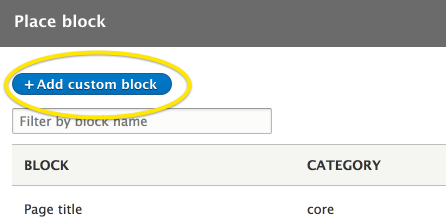
Button to add a custom block in Drupal 8

In the block settings, change the text format to Full HTML and click on the Source button to remove the rich text editor.

This will allow you to add a small HTML snippet without the rich text editor trying to encode the HTML.

In the body of the block, add the following snippet:

<p><a class="use-ajax" data-dialog-type="modal" href="/node/add/article">Article</a></p>


step 2: Using the block

Set the block in its correct ragion

you can also add more class to the link above to style it as a button

You can adjust the width by adding the data-dialog-options attribute:

data-dialog-options="{&quot;width&quot;:800}"


I’m including the HTML entity &quot; because that will end up being a quote mark in the rendered HTML.

The full snippet with a width of 800 pixels is:

<p><a class="use-ajax" data-dialog-options="{&quot;width&quot;:800}" data-dialog-type="modal" href="/node/add/article">New Article</a></p>


You can use this method to display any valid Drupal path in a modal.

These examples show the power of Drupal 8’s dialog API. With just a couple of attributes in a standard link, you can display any path in a modal.



Code Snippet
Read More
Creating a modal in Drupal 8 with one line of HTML By Blair Wadman
What's New in jQuery UI
Create a modal in Drupal 8 in a custom module By Blair Wadman
Tags
Drupal
Drupal 9
Jquery UI
Modal Dialogs
Module Development
Front-End
Code Example
use-ajax
jquery integration

The Freelancer Assistance

Drupal Shared Space

Drupal Shared Space

Drupal Development

Drupal Development

Site Management

Site Management

Fullstack Service

Fullstack Service

Drupal Training

drupal training session

Proactive Maintenance

Proactive Maintenance
Review All Services

Buy Hourly Support


Drupal platform support for complex websites. The service includes support, training, troubleshooting, fixes, updates, tool creation and module building.
* Minimum order is for 5 hours of support
* For every 20 hours of order you will be entitled to an additional hour of support
* For every 50 hours of order you will be entitled to 5 additional hours of support


>> Payment <<

 
cards

מופעל על-ידי paypal

Legal

  • Home
  • Contact
  • Products

Copyright © 2026 DrupalVIP - All rights reserved

Developed & Designed by Yuval Ben-Hur