Adding AJAX callback events to form fields allows to dynamically update fields and other markup, while users interact with the forms.
AJAX callback functions on forms can be used to:
- Update existing or add new form fields,
- update values in form fields
- execute a variety of predefined AJAX commands or
- run custom JavaScript code
The typical steps involved:
- Create a new form or use hook_form_alter to change an existing form.
- Add an '#ajax' render element to a field that should trigger a callback function.
- Define name of the callback function and type of event that will use it.
- When the event is triggered by changing a form field's value the browser triggers an AJAX request
- Drupal receives the AJAX request and rebuilds the form. Using the information provided by the AJAX request data the form will have the required modification (one more element in a multi valued element, for example).
- After the form is rebuilt, the callback function is called to build the response to the AJAX callback.
- The callback function allows accessing the $form array and the FormStateInterface and must finally return a render array or some HTML markup or can execute an AJAX Command.
I copied a good example of implementing ajax support in few steps.
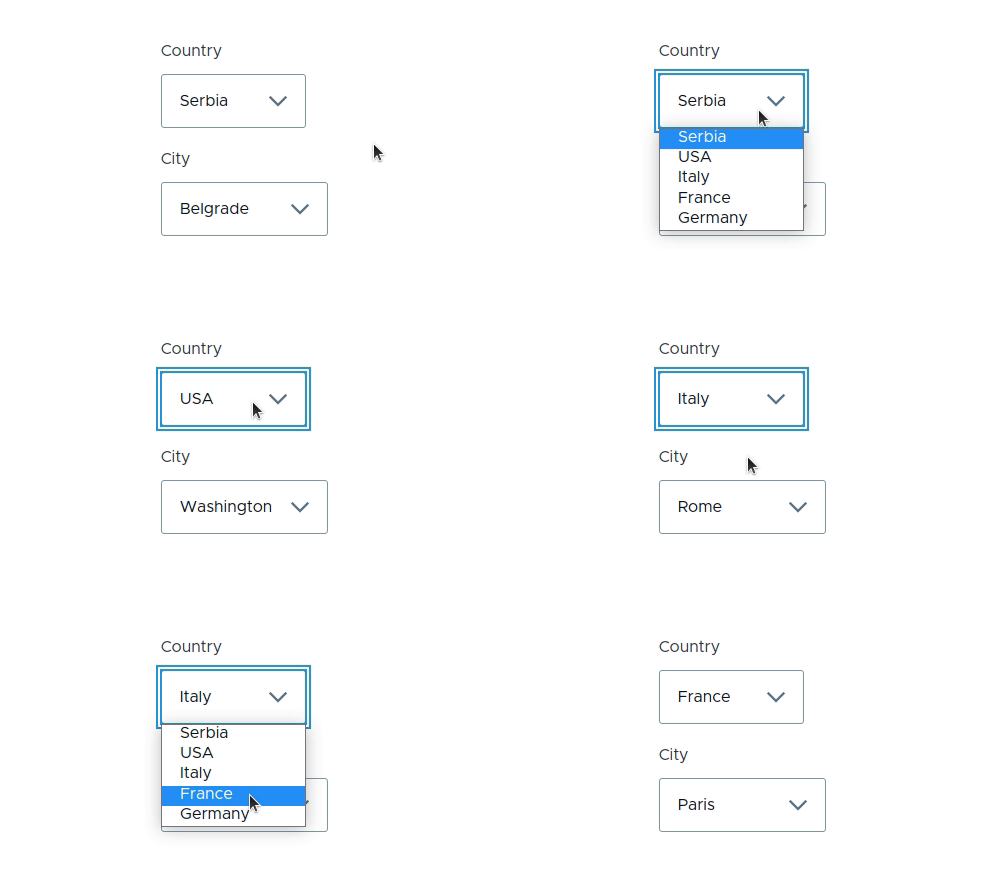
step 1: creating the route the the ajax form
drupalvip.ajax_form:
  path: '/ajax-form'
  defaults:
    _form: '\Drupal\drupalvip\Form\AjaxForm'
    _title: 'Ajax form'
  requirements:
    _permission: 'access content'
step 2: implementing the form object
<?php

namespace Drupal\drupalvip\Form;

use Drupal\Core\Form\FormBase;
use Drupal\Core\Form\FormStateInterface;

class AjaxForm extends FormBase {

  public function getFormId() {
    return 'drupalvip_ajax_form';
  }

  public function buildForm(array $form, FormStateInterface $form_state) {
    $triggering_element = $form_state->getTriggeringElement();

    $form['country'] = [
      '#type' => 'select',
      '#title' => $this->t('Country'),
      '#options' => [
        'serbia' => $this->t('Serbia'),
        'usa' => $this->t('USA'),
        'italy' => $this->t('Italy'),
        'france' => $this->t('France'),
        'germany' => $this->t('Germany'),
      ],
      '#ajax' => [
        'callback' => [$this, 'reloadCity'],
        'event' => 'change',
        'wrapper' => 'city-field-wrapper',
      ],
    ];

    $form['city'] = [
      '#type' => 'select',
      '#title' => $this->t('City'),
      '#options' => [
        'belgrade' => $this->t('Belgrade'),
        'washington' => $this->t('Washington'),
        'rome' => $this->t('Rome'),
        'paris' => $this->t('Paris'),
        'berlin' => $this->t('Berlin'),
      ],
      '#prefix' => '<div id="city-field-wrapper">',
      '#suffix' => '</div>',
      '#value' => empty($triggering_element) ? 'belgrade' : $this->getCityForCountry($triggering_element['#value']),
    ];

    return $form;
  }

  public function reloadCity(array $form, FormStateInterface $form_state) {
    return $form['city'];
  }

  protected function getCityForCountry($country) {
    $map = [
      'serbia' => 'belgrade',
      'usa' => 'washington',
      'italy' => 'rome',
      'france' => 'paris',
      'germany' => 'berlin',
    ];

    return $map[$country] ?? NULL;
  }

  public function submitForm(array &$form, FormStateInterface $form_state) {  }

} // end of class
A few notes for your attention:
- review the property: ajax, on the first select element
'#ajax' => [
'callback' => [$this, 'reloadCity'],
'event' => 'change',
'wrapper' => 'city-field-wrapper',
],
the #ajax property include the callback method, the event in which it will be triggered and the section it will look for the change - The element that will be changed is defined by section element
'#prefix' => '<div id="city-field-wrapper">',
'#suffix' => '</div>', - The callback is declared like any submit method:
public function reloadCity(array $form, FormStateInterface $form_state) - The submitForm method is empty, and even though it will not being used it must be implemented
public function submitForm(array &$form, FormStateInterface $form_state) { }

Code Snippet
<?php
  namespace Drupal\drupalvip\Form;

  use Drupal\Core\Form\FormBase;
  use Drupal\Core\Form\FormStateInterface;

  class AjaxForm extends FormBase {

    public function getFormId() {
      return 'mymodule_ajax_form';
    }

    public function buildForm(array $form, FormStateInterface $form_state) {
      $triggering_element = $form_state->getTriggeringElement();

      $form['country'] = [
        '#type' => 'select',
        '#title' => $this->t('Country'),
        '#options' => [
          'serbia' => $this->t('Serbia'),
          'usa' => $this->t('USA'),
          'italy' => $this->t('Italy'),
          'france' => $this->t('France'),
          'germany' => $this->t('Germany'),
        ],
        '#ajax' => [
          'callback' => [$this, 'reloadCity'],
          'event' => 'change',
          'wrapper' => 'city-field-wrapper',
        ],
      ];

      $form['city'] = [
        '#type' => 'select',
        '#title' => $this->t('City'),
        '#options' => [
          'belgrade' => $this->t('Belgrade'),
          'washington' => $this->t('Washington'),
          'rome' => $this->t('Rome'),
          'paris' => $this->t('Paris'),
          'berlin' => $this->t('Berlin'),
        ],
        '#prefix' => '<div id="city-field-wrapper">',
        '#suffix' => '</div>',
        '#value' => empty($triggering_element) ? 'belgrade' : $this->getCityForCountry($triggering_element['#value']),
      ];

      return $form;
    }

    public function reloadCity(array $form, FormStateInterface $form_state) {
      return $form['city'];
    }

    protected function getCityForCountry($country) {
      $map = [
        'serbia' => 'belgrade',
        'usa' => 'washington',
        'italy' => 'rome',
        'france' => 'paris',
        'germany' => 'berlin',
      ];
      return $map[$country] ?? NULL;
    }

    public function submitForm(array &$form, FormStateInterface $form_state) {  }

} // end of class